Install free
Running for 400+ Vietnamese shops

Automatically find new customers on Facebook

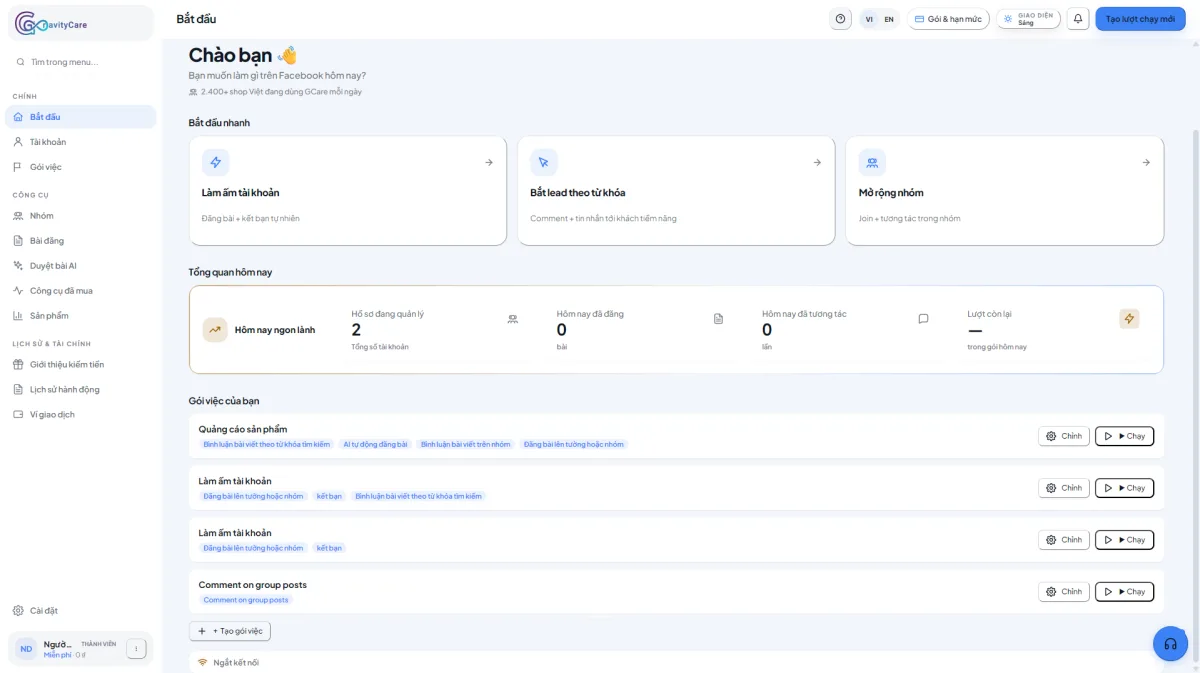
Install in Chrome and GCare comments on the right posts, messages prospects, joins groups and publishes posts for you — at human pace.

No card required · Runs on your own Facebook · Your password never leaves your device

Scroll to explore
01 · Overview

How does GravityCare work?

Overview

Watch demo

Running for Vietnamese sellers

M Mit Store Fashion
H Hao Bakery F&B
S Saigon Sneaker Sneakers
L Linh Cosmetic Beauty
B Be Cung Shop Mom & Baby
A Anpha Agency Agency
V An Flower Garden Florist
K Kafe Studio Coffee

A sample of shops and agencies using GCare. You can be next.

02 How it works

New customers do not find your shop on their own.

Every day thousands of people post asking to buy, looking for a shop, needing advice in Facebook groups. But you cannot sit and watch all day to comment and message each one.

GCare is a Chrome extension that does it for you — commenting on the right posts, messaging prospects, joining the right groups and publishing posts, on your own account, at human pace. You handle closing; GCare handles finding.

Three steps. Live in about 5 minutes.

No developer, no docs to read. If you can use Facebook, you can use GCare.

  1. 01
    30 seconds

    Install in Chrome

    Go to the Chrome Web Store and click "Add to Chrome". About 30 seconds.

  2. 02
    1 minute

    Log in to Facebook as usual

    Sign in to Facebook in Chrome as you always do. Your password never leaves your device.

  3. 03
    3 minutes

    Pick a scenario, add keywords, turn it on

    Pick a ready-made scenario (lead capture, group growth...), enter the keywords for your audience, switch it on and GCare runs.

03 Product

Four ways GCare brings customers to you

01

Comment on the right posts

GCare finds posts by your keywords — in groups or across Facebook — and leaves a natural, AI-written comment right when someone is asking to buy or looking for a shop.

Matches buyer keywords Natural AI writing
Minh Nguyễn · Nhóm Mẹ & Bé
Cần tìm shop bán đồ sơ sinh uy tín, ai biết chỉ mình với ạ 🙏
G
GCare · đã bình luận
Shop mình chuyên đồ sơ sinh cotton organic nè bạn, inbox shop tư vấn cho bé nha 🥰
02

Message prospects

For people who just posted looking for a product, GCare sends an AI-written opener that references their post and starts a real conversation — not spam.

Unique message per person Human pace
Linh
vừa đăng "tìm shop bán váy"
Đã nhắn
vừa đăng "cần tư vấn son"
Đã nhắn
Quân
vừa đăng "ai bán giày sale"
Đã nhắn
03

Join & engage groups

Safe

Find and join the groups your buyers are in by keyword, then post and comment to stay visible and pull people back to you.

Right audience groups Consistent presence
Hội bán giày Hà Nội — 24.5K thành viên
Đã join
Mom & Baby Sài Gòn — 18.2K thành viên
Đã join
Chợ đồ secondhand HCM — 41K thành viên
Đã join
04

AI writes natural content

Comments, messages and posts are all written by AI (Gemini, Claude, OpenAI) in your shop voice — natural, on-context, never robotic.

Gemini · Claude · OpenAI In your shop voice
AI soạn nội dung
Mình thấy bạn đang tìm đồ sơ sinh — shop mình có nhiều mẫu cotton organic, bạn inbox shop tư vấn nha.
Chào chị, em thấy chị vừa hỏi mua váy. Shop em đang có mẫu hợp dáng, chị đang tìm loại nào ạ?
Tuần này shop về mẫu mới cho bé, mom nào quan tâm comment để mình tư vấn nha.
04 What shops are saying
“We used to put people on commenting and messaging in groups all day. Now GCare handles finding customers and the team just focuses on closing.”
T
Tuan Nguyen
Shoe shop owner · Hanoi
“I sell online on my own and have no time to engage in groups. GCare comments and messages prospects for me — orders come in far more steadily.”
L
Linh Pham
Clothing shop owner · HCMC
“We run 12 fan pages for clients. GCare reaches prospects by keyword across multiple accounts, saving us a lot of manual work.”
D
Duc Hoang
Marketing agency · Da Nang

Free plan available. Pro from $9.90/month.

See full pricing
05

Frequently asked

Is it safe? Will Facebook flag my account?
GCare runs inside your own browser at human pace, with built-in limits so Facebook does not see unusual activity. You can also set your own limits (e.g. up to 100 comments per hour, 30 messages per day) for extra peace of mind.
Is GCare a mass comment/message spam tool?
No. GCare is a marketing-automation tool that runs on your real account: it comments, messages, joins groups and publishes posts — but in a controlled way, targeted by keyword, at human-like speed. AI writes unique content per post, with no link-dropping and no blasting one message at scale. GCare does NOT farm throwaway accounts and does NOT do "checkpoint bypass". You set your own volume and speed limits to keep accounts safe. Multi-account support on Pro/Agency is for you or an agency to operate your own real pages.
I am not technical. Can I still use it?
Yes. If you know how to use Facebook, you can use GCare. Ready-made scenarios (lead capture, group growth, community care) are built in — just enter your keywords and switch one on.
Are there any fees?
There is a free plan for life with 50 comments a day. If you need more, upgrade to Pro. No hidden fees, no upsells, no card required to start.
I run multiple Facebook accounts. Can I use them all?
Yes. Pro covers 5 accounts. Agency covers up to 20.

Try it free. Uninstall anytime.

30-second install · Free plan for life · No card required

No card required · Runs on your own Facebook · Your password never leaves your device

Support

How can we help?

We reply during business hours (9am-6pm, Mon-Sat).